

How to use Nano Banana in Photoshop
Nano Banana gives you a quick way to post-production photos in Photoshop. You use it to fill gaps, rebuild edges, and clean rough areas in seconds. The tool helps you fix mistakes that slow you down in normal editing. You get clear, sharp results without extra work. Many editors use Nano Banana when they want speed and simple control. In this guide, I show you how to use Nano Banana step by step so you can improve e-commerce photo with ease.
Reasons You Like Nano Banana
Nano Banana works like a tiny repair brush. You paint on a bad spot, and the tool creates new pixels that match the rest of the image. You keep full control, guide every stroke and also get smooth results that look real.
The tool fits many jobs. You fix dust on products, spots on skin, broken edges on hair or clothes and small holes or gaps in the frame. You can even build missing parts on old photos. Nano Banana keeps the edit simple and stress-free.
What Nano Banana Does
Nano Banana lets you mend small flaws in seconds. You can paint on the spot, and the tool builds new pixels right away. It allows you to keep control of the edit, and you see the results in real time. The tool feels simple, smooth, and fun.
N.B.: We use “Nano Banana” as a nickname for Generative Fill (AI Fill) because it fills missing or rough areas fast and smoothly.
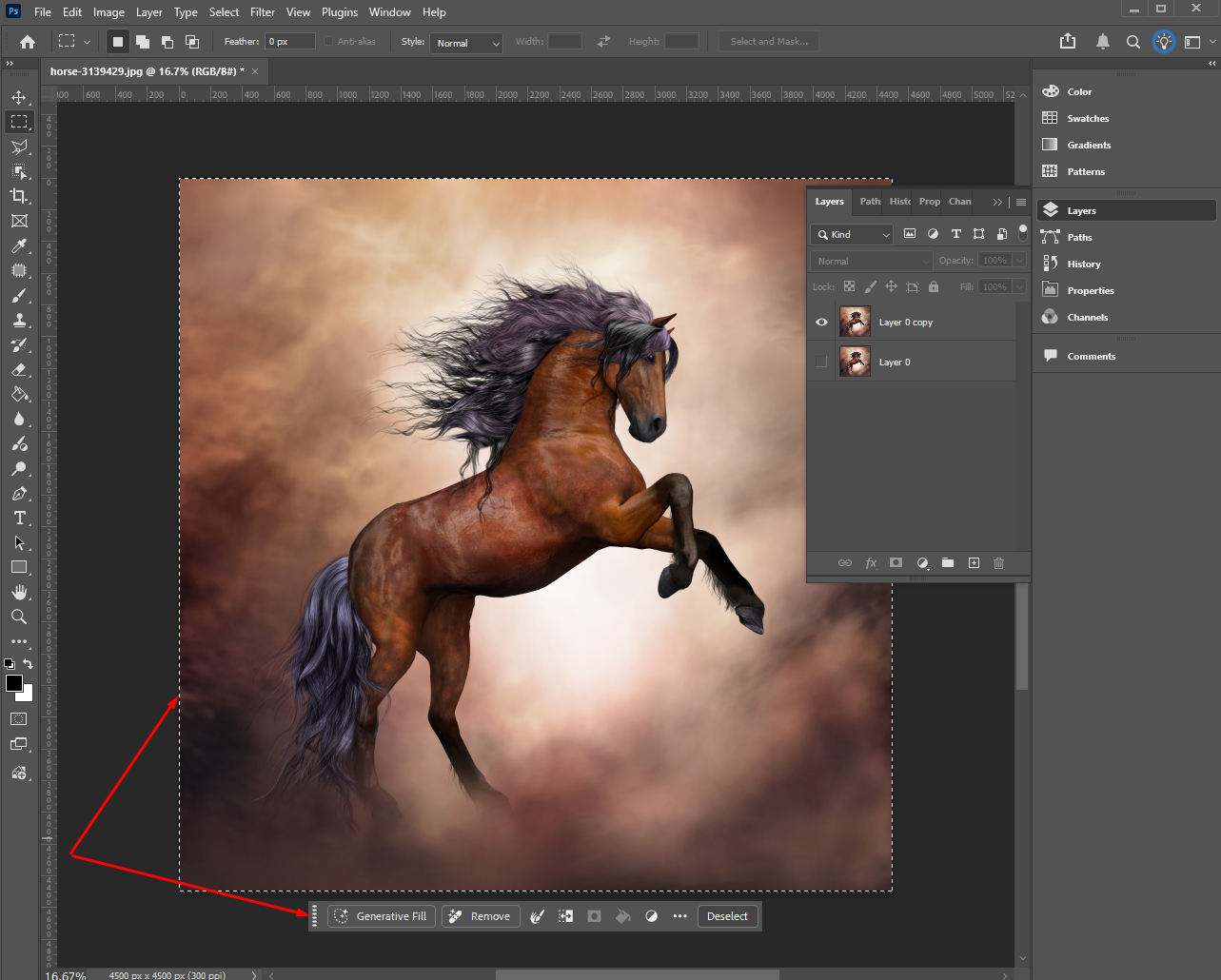
Select any area using Lasso Tool (L) or Marquee Tool (M), look below the image, you will see Generative Fill, Type a prompt or leave it empty, and finally Click Generate.
1) Use Nano Banana in Photoshop (Gemini Nano Banana)
There are two common ways people mean “Nano Banana”:
Option A: Nano Banana inside Photoshop via a plugin (most common)
One popular plugin is listed on Adobe Exchange and also sold on aescripts.
Typical steps look like this:
- Install the Nano Banana Photoshop plugin (from the plugin’s page).
- Get a Gemini API key (the plugin usually asks for it).
- Open Photoshop and open your image.
- Select the area you want to edit (selection tools).
- Run the plugin panel/command.
- Enter your prompt like:
- “replace background with clean white studio backdrop”
- “remove glare, keep label sharp”
- Generate, then pick a result and refine with masks/brushes in Photoshop.
Option B: “Nano Banana” as Adobe’s described integration (tutorial style)
Adobe has learning content showing Nano Banana edits paired with Photoshop tools.
General workflow is the same:
- Select the area.
- Run the Nano Banana generation/edit tool (where it appears in your setup).
- Refine with layers, masks, and standard retouch tools.
2) Use the Contextual Task Bar in Photoshop (the floating bar)
What it does: shows the next best action based on what you’re doing (select, remove, mask, type, transform, etc.).
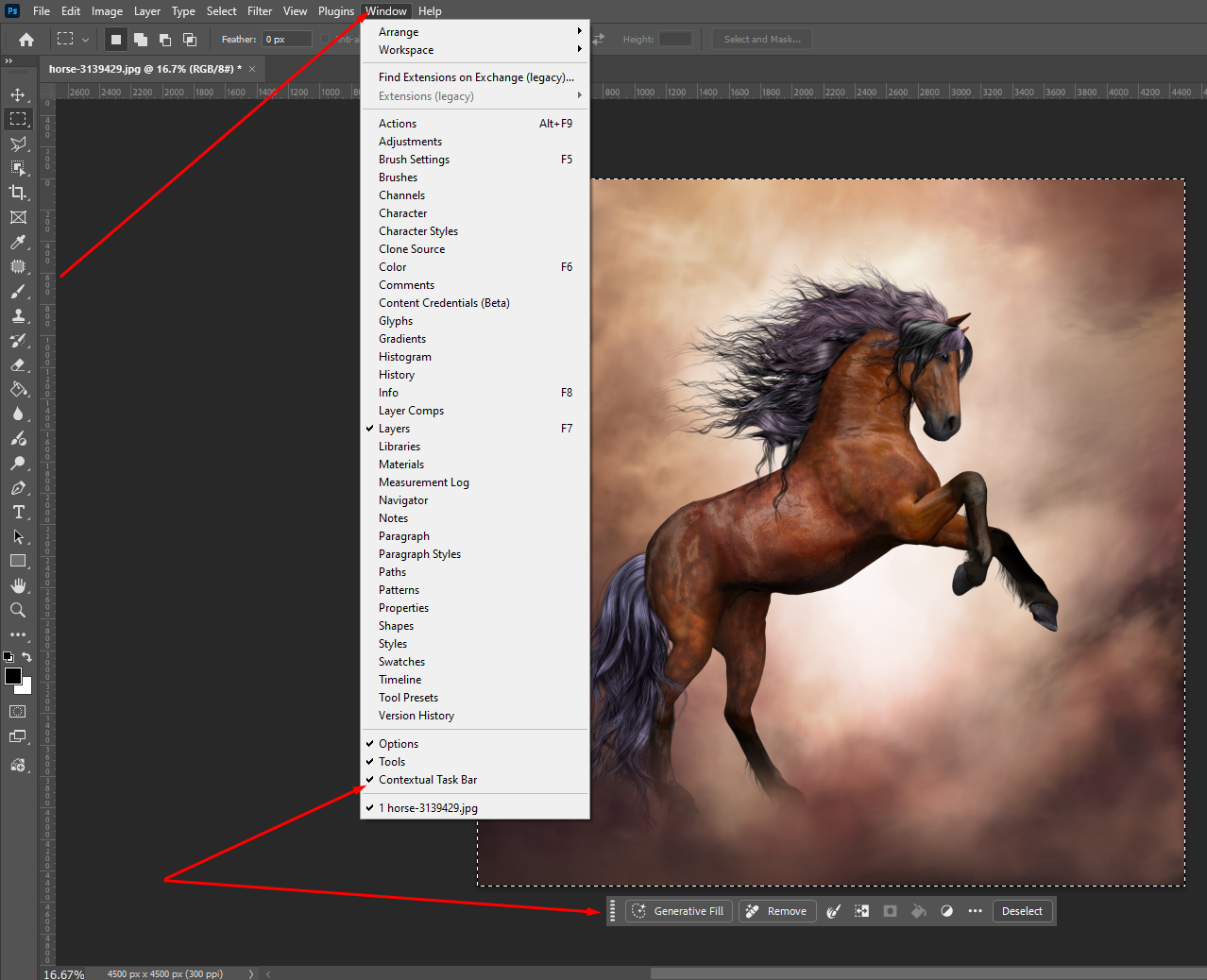
Show it (if you can’t see it)
- Go to Window.
- Click Contextual Task Bar to enable it.
Use it for common jobs
A) Select subject fast
- Open an image.
- On the Contextual Task Bar, click Select Subject (if it appears).
- Refine the selection (Add/Subtract) from the same bar.
B) Remove unwanted objects
- Make a selection around the object.
- In the Contextual Task Bar, click Remove (if available).
C) Mask from a selection
- Make a selection.
- Click Create Mask (or mask option shown in the bar).
3) Use Generative Fill (AI Fill) in Photoshop
Goal: add, remove, or change something inside an image.
- Open your image in Photoshop.
- Make a selection around the area you want to change.
- Use Selection Brush, Lasso, or Object Selection.
- Look for the Contextual Task Bar near your selection.

- Click Generative Fill.
- Type a prompt (or leave it blank).
- Blank prompt usually removes and blends.
- Click Generate.
- Click the variation thumbnails to pick the best result.
- Keep it non-destructive: Photoshop generates results on a new generative layer (so you can hide, mask, or delete it).
Quick prompt tips
- Be specific: “clean white wall,” “remove person,” “extend background with studio gray.”
- Match the scene: “soft daylight,” “shallow depth of field,” “same angle.”
Tips for Better Results
- Work in small steps
- Zoom in and out often
- Keep your brush small
- Use Undo when needed
- Test different strokes
When to Use Nano Banana
Use it on product shots when you need crisp edges, portraits when you want smooth skin, eCommerce images where clean lines matter, and old family photos that need repair. The tool helps you create clean, sharp edits without stress.
Final Thoughts
Nano Banana gives you more power and speed in Photoshop. You fix problem areas, rebuild details, and shape your image with clean results. Nano Banana AI enables you work faster and keep your edits simple. You also get more control on tricky spots that normal tools fail to fix. Add Nano Banana to your workflow when you want strong results in less time. Try it on your photos and see how much better your edits look.


