

January 23, 2013

How to create a Glossy Text Effect in Photoshop Open a new document in Photoshop. Size maintain between 1152 x 864 pixels. Foreground and background will be #5e4a3f and #271509. From the Gradient tool option bar select Linear Gradient Icon. From top to bottom in the canvas drag it. Now add noise through go to Filter to Noise and Add Noise. The amount will be 1 also select the Gaussian distribution. Now write a text on the canvas. With the font of RiotSquad and font color is #c7c7c7 and font size will 365. Copy this text layer. Change the duplicate’s
January 19, 2013

I open Adobe Photoshop in my computer. Create a new document and set its size as width 600 x height 450 pixels. Set color mode in RGB. Where set resolution must be at 72 DPI. Go to Layer then Duplicate Layer and press OK. Follow this step duplicate the background. Save this new layer as your wish, I save it with the name of ‘Background Pattern’. To change the several textures, double click on previous layer named as Background Pattern. By go to ‘Pattern Overlay’ select the ‘Cherry01′ and press OK. Double click on ‘Background Pattern’ to create the vignette
January 17, 2013

To create a Photoshop image we have to open to make an image. So open the Adobe Photoshop. Create a document size with 1200 x 600 and save it as a .PSD file. It will be in RGB mode and 72 Dpi. Open a brick wall texture in the Photoshop. Through transform (Ctrl+T) change the texture and resize as you want. Make it darker by go to levels > Image > Adjustments > Levels or Command/Ctrl+L. The figure is: Make the text with the font “Impact”. Character set by 320pt, (Auto), 80% and 150%. And layer Opacity – 100% with
January 9, 2013

In this article I will describe how to draw two faces by Digital Painting. It’s just a simple article. The description is given below. At first open the Adobe Photoshop and open a new file. For open a new file go to File – New from the Menu bar. Now we have to decide the dimension of the canvas in which you feel comfort. This will be better if w choose a standard paper size. Intended for this image within scrupulous, approximately 9 inches with 12 inches would be sufficient. For the suitable image printing purposes always have to remember that
January 4, 2013

Before designing in your computer should have contained the Adobe Photoshop. Then you will install the font of “Rothenburg Decorative”. And install the brush of “Grunge Brushes”. Now open your Photoshop and create a new document which size will be, as I prefer 1800 x 1300 pixels also which is in RGB Mode. But you can prefer another size like you want. Set the DPI at 72 and choose your background color with this dark grey color #1f1f1f. In this step create a new layer; rename it “text”, here use these grunge brushes and click the center of the document
January 3, 2013

For designing a commercial image or creative work you can show your talent making a Design Golden Flame in Adobe Photoshop. Lets see how. Open Adobe Photoshop and open a new document which size I prefer 1200*800px, then fill the background color by black color. On the background type, here who favor which font, doesn’t matter to select any font, I just wrote some texts onto it. Now we are in second layer. I applied the layer blending options. From style select outer glow, inner glow, bevel and emboss-contour, stroke. Now set in the outer glow-structure-blend mode (screen), opacity (75%),
January 2, 2013

Would like to create images really show up? Whereas stereoscopic special effects similar to Cyan/Red 3D are frequently shaped with fancy photography activities, I’ll be produce with simple deception image editing. Jump right on in and observe how easy it is able to be, by way of an easy version for Photoshop beginners, and another second element for users that want to give image some more get-up-and-go. Create a Red or Cyan Effect Out of an Image in Photoshop The practical term for a 3D image is an Anaglyph, which are generally designed by photographing a subject from two separate
January 1, 2013
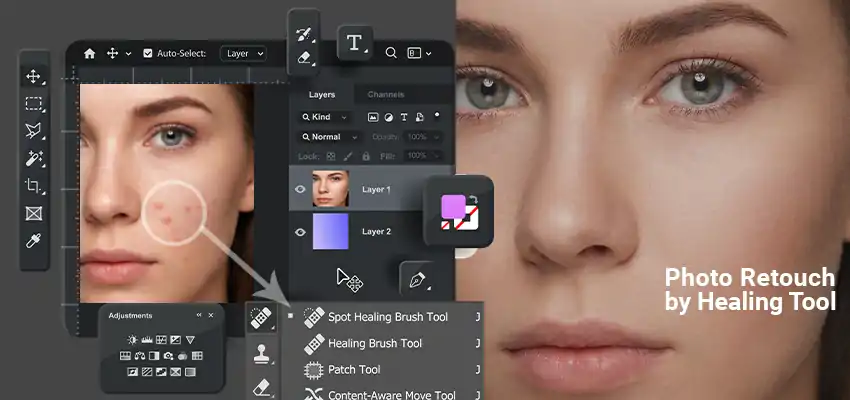
There’s always one thing wrong with a photo. A pimple that showed up the day of the shoot. A scratch on a scanned print from twenty years ago. A power line running straight through what would’ve been a perfect sky. Photoshop actually has a good set of tools for exactly this kind of stuff, and once you get used to which one does what, most fixes take way less time than you’d think. Let’s go through them one by one. Spot Healing Brush Tool This is usually the first tool people learn, mostly because it’s so easy to use. Small
December 29, 2012

In the market new iPad has been released. A lot of people may expect like to learn how to design this dazzling Apple product with developing other iPad correlated graphics based on the PSD file. In this tutorial I will show you how to design Adobe Photoshop on iPad. At here we will use dissimilar tools, such as gradient tools, different blending mode tools, shape tools, and loads of enormous techniques. At first, we have to open a new document. Open the Photoshop software and create a new document by through the File-New. Where I’m use a Web preset means
December 28, 2012

Using Typographic Effect in Photoshop I design text which is “Letter Drops into Water”. Let it try. Here we will apply custom brush, free transform tool and liquefy filter. Design a texts drop in water typography effect in photoshop At first you have to download Photoshop software means PSD file. You have to search at Google through free download Photoshop CS3 or if you want latest version that will better for you. Following stocks and complete this tutorial: Font, Water Texture, Water Brushes, this tutorial for intermediate level. Now I decide on the black surroundings, and type something like you
December 28, 2012

For to do design we have to open Adobe Photoshop or Adobe Illustrator, choose the font that you want to use in your drawing or design. Where I used Xirod Font and tweaked it a minute. Then create it outline and save it into Adobe Illustrator 8. (Cinema 4D open just vectors into this Adobe Illustrator version). Amazing explosion 3d words in photoshop Go to Cinema 4D and open the Illustrator folder, after open the Cinema 4D you will see that it’s inside of a group. At first you should ungroup them and add the extrude NURBS to all letter